 pinstrike
Clones welcome
Pinstrike recognises the USB chip on your board and suggests the right settings, old Nano bootloaders included.
- CH340
- CH341
- FTDI FT232R
- CP2102
- ATmega16U2
Write a sketch and upload it over USB. No laptop needed, and it's free.
Early access coming to Google Play
Pinstrike is a free Android app that writes, compiles and uploads Arduino sketches over USB.
Sketch to running board in seconds.
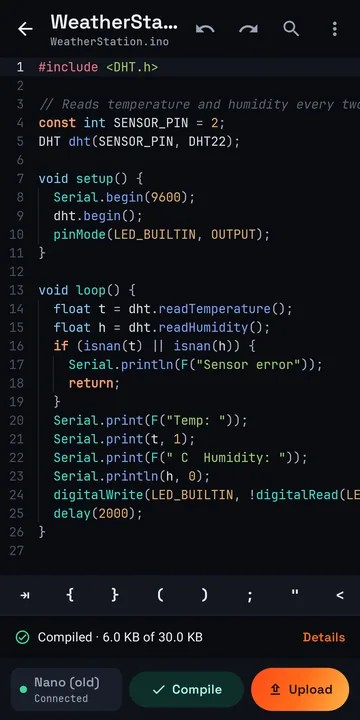
A code editor made for touch screens.
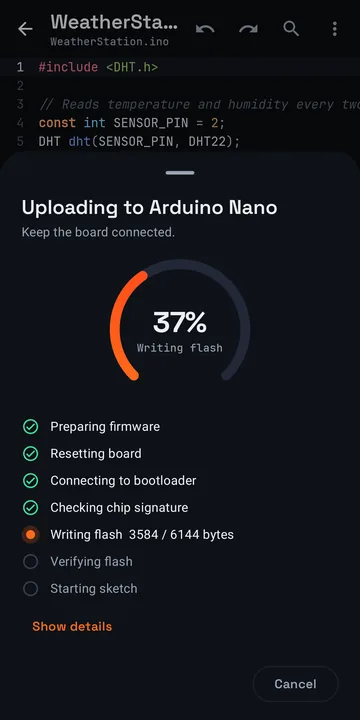
Plug in the board and tap Upload.
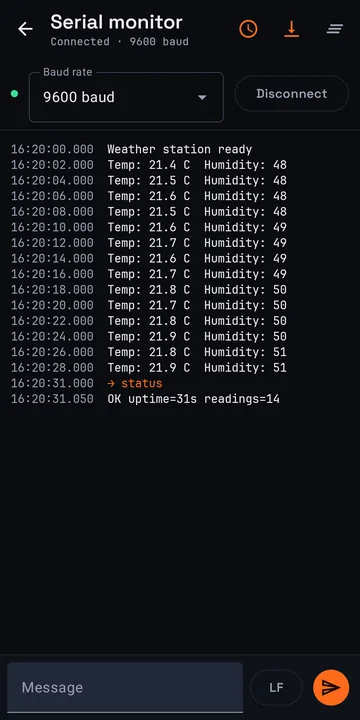
See your sketch talk back in the serial monitor.
Cheap clones included.
Pinstrike recognises the USB chip on your board and suggests the right settings, old Nano bootloaders included.
Your sketch builds with the Arduino CLI, exactly like on a laptop.
When an upload fails, Pinstrike tells you what to change.
After writing, Pinstrike reads the chip back and compares it with your sketch.
Uno and Nano today, with Mega and ESP32 next.
ATmega328P with ATmega16U2 or CH340 USB
USB-C to USB-B cable
ATmega328P or ATmega168 with FTDI or CH340 USB, new and old bootloader
USB-C to Mini-B cable
Works on Android 8 and newer phones with USB OTG.
Yes. Pinstrike writes, compiles and uploads sketches entirely from an Android phone or tablet. You need a phone with USB OTG support and a cable that connects it to the board. Compiling needs an internet connection.
Arduino Uno R3 and Arduino Nano with ATmega328P or ATmega168, including clones with CH340, FTDI, CP210x or ATmega16U2 USB chips. Nanos with the old bootloader work too. Mega 2560, Leonardo, ESP32 and ESP8266 support is planned.
A data cable from your phone to the board. That is USB-C to USB-B for an Uno and USB-C to Mini-B for most Nanos. A small USB-C OTG adapter with the board's normal cable also works. Charge-only cables carry no data and won't work.
Yes. Pinstrike is free, has no ads and needs no account.
Your sketch travels over HTTPS to the Pinstrike compile server, is compiled with the official Arduino CLI in an isolated container without internet access, and is deleted when the compile finishes. The result may stay in server memory for up to an hour so an identical compile is instant. Your sketches are otherwise stored only on your phone.
No. Pinstrike uploads through the bootloader already on the board, the same way the Arduino IDE does. It never changes fuses, lock bits or the bootloader, checks the chip signature before writing and refuses sketches that would not fit. A failed upload leaves an incomplete sketch that the next upload replaces. Physical damage comes from wiring mistakes.
No. Pinstrike is made by Arc Labs AS and works with Arduino-compatible boards. Arduino is a trademark of Arduino S.r.l.